How to use AI without giving up your data
A practical guide to the settings, rights, and decisions that keep your data yours

99% of Americans use AI every week. Most have no idea. Your data is being stored, used for training, and reviewed by humans, all by default. This guide covers:
Where your data goes when AI processes it (cloud, on-device, or encrypted)
How Google, Apple, and Samsung handle your privacy differently
A 30-minute audit to find the 15–25 AI features already active on your devices
10 questions to ask before trusting any app with your data Settings to change today to take back control in 15 minutes
Why AI privacy matters right now
More than half of Americans use AI every week. Only 1 in 20 actually trusts it.
If you're not comfortable with it yet, you're in the majority.
You’re already an AI user
According to a Gallup study in late 2024, 99% of Americans used an AI-enabled product in the past week. Nearly two-thirds of them (64%) had no idea they were doing it. AI already runs inside apps you use every day. Your weather forecast, your GPS navigation, your email inbox, search results you scroll through. How your phone sorts photos by faces, places, and dates. Fraud detection that flags suspicious charges on your credit card.
You didn't opt into any of it. It showed up. And now it's part of how your phone, email, and apps work. So are you using it on your terms?
People aren't only skeptical, they're leaving
57% of U.S. adults interact with AI several times a week, according to Pew Research Center. But when YouGov asked how much Americans trust AI, only 5% said "a lot." Globally, a KPMG/University of Melbourne study of 48,000 people across 47 countries found only 46% willing to trust AI systems.
And people aren't just expressing opinions. They're acting on them:
82% of consumers say companies losing control of personal data inside AI systems is a serious problem, with 43% calling it "very serious"
81% believe the information collected by AI companies will be used in ways people never agreed to
82% have abandoned a brand in the past 12 months over concerns about how their personal data was being used
Four out of five consumers walked away from brands that mishandled their data. They're leaving, switching, and choosing companies that respect their privacy.
What this guide will give you
We're not going to tell you to stop using AI. That would mean giving up tools that make life easier.
But we will give you three things:
Clarity - What happens to your data when AI processes it, where it goes, who can see it, and how long it stays.
Comparison - How the platforms you already use (Google, Apple, and Samsung) handle your privacy differently.
Control. Specific settings to review, questions to ask, and steps to take today so that AI in your life works for you.
You don’t need to be an expert or give up the tools you use every day to protect your privacy. Knowing what’s happening and what you can control puts you back in charge. And this guide shows you how.
Quick check (30 seconds)
Pick up your phone. Open Settings and search for "AI" or "Intelligence." Count how many AI features are already active on your device.
People usually find between 5 and 10 they didn't know about. That number is your starting point.
What happens to your data when AI processes it
When you type a question into ChatGPT, ask Siri for a recipe, or let Google summarize your emails, where does your data go? Your answer depends on which model the service uses. And the differences are enormous.
Model 1: Cloud processing. Your data leaves your device
This is the most common approach. Your data is sent to powerful remote servers, processed by a large AI model, and results come back to you. Think of it like mailing a letter to get advice. The advice comes back, but a copy of your letter stays at the office.
Who uses it: ChatGPT, Google Gemini, Perplexity AI, Meta AI, DeepSeek
Your data lives on someone else's servers. It might stick around for months or even years. Humans could review it. And it could be used to train future AI, meaning your words, patterns, and preferences become part of how the model works.
Take ChatGPT, for example. Even if you opt out of training, conversations stick around for 30 days. If you don't opt out, they could stay forever. Human trainers may review your conversations.
And as of February 9, 2026, ChatGPT now shows ads matched to your conversation topics, with ad personalization on by default. A conversation you had about back pain might influence which ads you see.
Model 2: On-device processing. Your data stays on your phone
AI runs directly on your device using a dedicated chip called a Neural Processing Unit (NPU). Everything happens locally, on your phone, with no data leaving your hands. Think of it like cooking at home. All your ingredients stay in your kitchen.
Who uses it: Apple Intelligence (for most tasks), Samsung Galaxy AI (for basic features), Google Pixel
Because everything stays on-device, nobody can breach it on a server, use it for training, or have a human reviewer read through it. But on-device models are smaller, roughly 3 billion parameters compared to 100 billion or more in the cloud. Less capability for now, though the gap is closing fast. 970 million smartphones with dedicated AI chips shipped in 2025 alone.
Model 3: Zero-trust architecture. Your data stays encrypted
Your data is encrypted with keys only you hold. The service stores or processes it without ever being able to read it. No one is trusted by default, not even the service provider. Think of a safe deposit box at a bank. The bank provides the vault and the security, but only you have the key. The bank can't open it. The bank's employees can't open it. Even if someone breaks into the bank, your box stays locked.
Who uses it: Proton Mail, Signal, some privacy-first tools
Even if the company gets hacked or subpoenaed, your data stays encrypted. Proton has proven this model works commercially. They built two AI assistants (Scribe and Lumo) that operate under zero-trust encryption, meaning Proton itself can't access your data at any point in the process.
How long AI companies keep your data
You deserve to know where your data goes after processing, how long it stays there, and who can access it. Check this out:

As you can see, the difference between them is huge.
How to opt out of AI data training
Deleting a message doesn't untrain the AI. Once your data is incorporated into model training, it becomes permanent. Unlike deleting a social media post, there is no undo button. Your conversation patterns, writing style, and personal details become part of the model's weights, and there's no way to remove them.
Before you use any AI tool, ask yourself three things:
1. Where is my data processed? (Device, cloud, or encrypted cloud?)
2. Is my data used to train AI models? (Can I opt out?)
3. Can I actually delete it? (Does “delete” mean delete?)
If the service can't answer these clearly, that tells you something. We go deeper on this in Section 8 with a full 10-question framework.
Google vs Apple vs Samsung. How they handle AI privacy
Google, Apple, and Samsung are racing to put AI into everything you do. Your email, your photos, your messages, your searches. But they handle your privacy very differently.
Google AI privacy. What Personal Intelligence collects
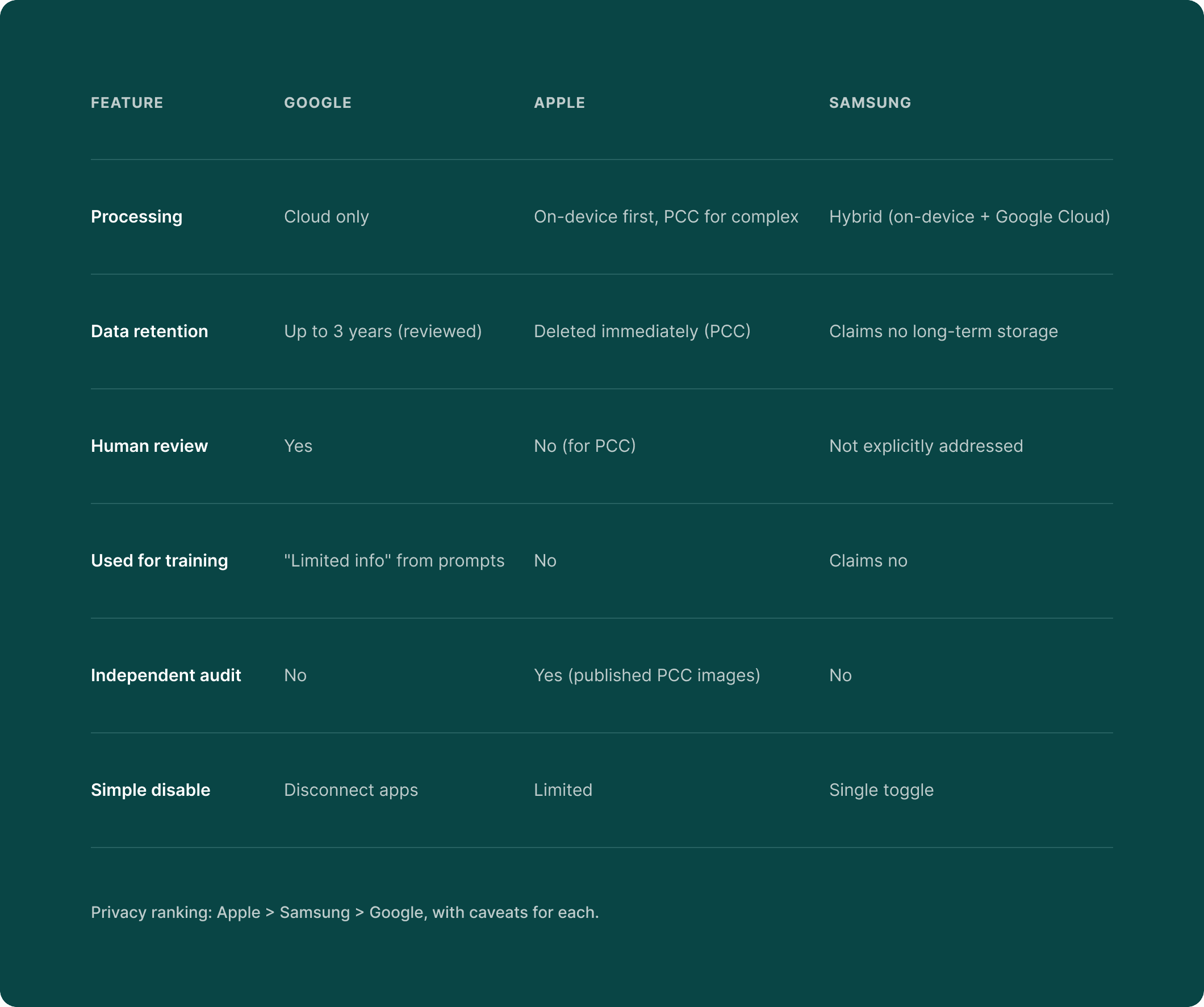
Google launched Personal Intelligence in January 2026, an AI that connects to your Gmail, Photos, Search history, and YouTube to create what Google calls a unified "Digital Brain." All processing happens in the cloud. Conversations can be stored for up to 18 months, with some retained for up to 3 years for human review. Google's own privacy page includes this warning: "Please don't enter confidential information that you wouldn't want a reviewer to see."
Google's own product asks for access to your Gmail inbox, then warns you not to share anything confidential with it.
Gemini Apps Activity is switched on by default for users 18 and older. Even when you turn it off, Google retains data for 72 hours. And even after you delete your conversation history, data already selected for human review stays for up to three years.
Apple Intelligence privacy. What stays on your device
Apple Intelligence launched across iPhone, iPad, and Mac through 2024 and 2025, using a different approach: on-device processing first, with Apple's Private Cloud Compute (PCC) for complex tasks.
AI tasks run entirely on your device using a 3-billion-parameter model. When a task requires more power, it goes to PCC, custom Apple Silicon servers where data is encrypted end-to-end, deleted after processing, and physically can’t persist.
But Apple isn't flawless here. They paid $95 million in 2025 to settle allegations that Siri recorded conversations without consent. Security researchers found data transmission continues even when users disable Siri's "Learn from this App" setting.
And when Apple Intelligence routes requests to ChatGPT, OpenAI's policies apply. Your Apple privacy protections end exactly where ChatGPT begins.
Samsung Galaxy AI privacy settings
Samsung’s approach is hybrid: on-device features powered by Gemini Nano, with cloud features powered by Google’s servers.
But when Galaxy AI needs the cloud, your data goes to Google, not Samsung.
On the positive side, Samsung offers the simplest privacy control of all three platforms, a single toggle: Settings > Advanced Intelligence > "Process data only on device."
Side-by-side comparison
Settings to check right now:
Google / Android users (5 minutes):
1. Visit myactivity.google.com and review what Google has stored
2. Check if “Gemini Apps Activity” is toggled on (it’s on by default)
3. Gmail: Settings > Data Privacy > Turn off Smart Features in BOTH locations
iPhone users (5 minutes):
1. Settings > Apple Intelligence & Siri and review what's enabled
2. Check if ChatGPT integration is active (separate privacy domain)
Samsung Galaxy users (2 minutes):
1. Settings > Advanced Intelligence > Toggle “Process data only on device”
Tradeoffs behind AI convenience
Every AI convenience involves a privacy tradeoff. Whether you know the terms is the part worth paying attention to.
AI photo search
When you search for "beach vacation" or "birthday cake" in your photos, AI makes that possible by analyzing every photo in your library. Faces, locations, objects, text, activities...
With Google Photos, analysis happens in Google's cloud and your photos are not end-to-end encrypted.
With Apple Photos, analysis happens on your device and photos never leave your phone for AI processing.
The average smartphone user has about 2,795 photos, and every single one gets analyzed.
AI email summarization
When Gmail or Outlook summarizes your email, the AI reads the full content. Everything. Financial statements, medical communications, legal correspondence, personal messages.
Gmail's Smart Features are switched on by default. You have to disable them in two separate locations, or one stays active.
AI writing assistants
Grammarly sends every keystroke to external servers for analysis. A 2026 privacy analysis ranked it among the most potentially privacy-damaging popular browser extensions.
ChatGPT now shows ads matched to your conversation topics, with ad personalization switched on automatically. All six major AI chatbot companies use chat data for training unless you opt out.
AI financial tools
When you connect a budgeting app to your bank through Plaid, something worth knowing: insights flow both ways. Your financial behavior feeds back to your bank through Plaid's "Bank Intelligence" product.
(Yes, your bank is learning about you through the app you downloaded to learn about your bank.)
Only about 10% of consumers are "very willing" to share financial data with AI tools.
Voice assistants
A 2025 peer-reviewed study from Northeastern University found "radically different approaches to profiling users" across Siri, Google Assistant, and Alexa. 77% of respondents said they'd use voice assistants more if privacy protections were stronger.
Health queries
Only about 10% of consumers are willing to share health or biometric data with AI tools. Yet HIPAA doesn't cover most consumer AI. Your ChatGPT health questions have zero legal protection. That symptom checker conversation? Completely unprotected.
The “stranger test”
Before using any AI feature, ask yourself: "Would I hand this information to a stranger on the street?" If the answer is no, check whether the AI tool processes it on your device or in the cloud, and whether it's used for training.
Privacy preserving AI. Technology that protects you
Most coverage of AI privacy gets one thing wrong: the technology to protect your data already exists, much of it is already running on your phone, and more companies should be using it.
We covered on-device processing, zero-trust architecture, and confidential computing in Section 2. Two more approaches are worth knowing about.
1. Federated learning: AI that learns without seeing your data
The AI model travels to each device, learns from local data, and shares only the lessons, never the data itself. Picture a teacher who visits every student's home, observes their study habits, then writes a general guide without taking notes about any specific student.
Google's Gboard keyboard improved next-word prediction by 24% using federated learning, without ever collecting a single text message.
2. Local document search
AI that indexes and searches your personal documents entirely on your device. Ask it a question, and it finds the answer in your files without uploading anything anywhere. Picture a research assistant who works only in your home office, pulling answers from your filing cabinet without photocopying anything.
Germany's data protection authority ruled in October 2025 that this approach has a "significant positive impact on privacy compliance."
What to look for when choosing AI tools:
• Does it process on-device first?
• If it uses the cloud, is the processing encrypted?
• Does it use your data to train models? (Look for opt-out options)
• Is the architecture independently verified?
What had to run in the cloud yesterday can run on your phone tomorrow, and the performance gap between private and cloud-based AI gets smaller every year.
How to audit your AI exposure in 30 minutes
You now understand how AI handles your data and which approaches protect your privacy. Here’s a practical question: how many AI features are active on your devices right now?
Let’s find out.
Audit 1: Your phone (7 minutes)
iPhone:
Settings > Apple Intelligence & Siri: Review all enabled features
Apple Intelligence can re-enable itself after iOS updates, so check after every single one
Settings > Privacy & Security > Analytics & Improvements: See what’s being shared
Settings > Apps > Photos > Enhanced Visual Search: Check if enabled (it's switched on by default)
Android:
Settings > Google > Manage Your Google Account > Data & Privacy
Check Web & App Activity, Location History, and YouTube History, all of which feed AI
Gemini Memory builds a persistent profile of you and has been switched on by default since late 2025
Google Play's January 2026 settings migration moved some controls, so verify yours haven't reset
Audit 2: Your email (5 minutes)
Gmail: Settings > Data Privacy > "Smart features and personalization," turn off in BOTH locations since both are switched on by default
Outlook: Settings > General > Privacy and Data > Review Copilot data access, where model training is on by default for personal accounts
Audit 3: Your cloud storage (5 minutes)
Google Drive: AI can analyze document contents for search and suggestions, and none of it is end-to-end encrypted
Dropbox: AI-powered search and summarization features are expanding, so check Settings > AI Features
iCloud: Apple's on-device approach means less cloud AI analysis, but enable Advanced Data Protection for end-to-end encryption
Audit 4: Your AI chatbots (5 minutes)
ChatGPT: Settings > Data Controls > "Improve the model for everyone," toggle off, and also check Settings > Ad Personalization
Claude: Settings > explicit training choice with clear opt-in or opt-out and retention terms
Gemini: Turn off “Keep Activity” to prevent human review
Meta AI: Requires submitting a formal objection form because there's no simple toggle for US users
Audit 5: Your financial apps (3 minutes)
Check which apps connect to your bank through Plaid or similar services
Review whether your budgeting app shares insights back to your bank
If you haven't opened a financial app in three months, delete it because it may still be collecting data
Audit 6: Your voice assistants (3 minutes)
Siri: Settings > Apple Intelligence & Siri > review "Listen for" settings and toggle off "Improve Siri & Dictation"
Google Assistant: Review voice history at myactivity.google.com and set auto-delete to 3 months
Alexa: Alexa app > Settings > Alexa Privacy > Review Voice History and enable auto-deletion
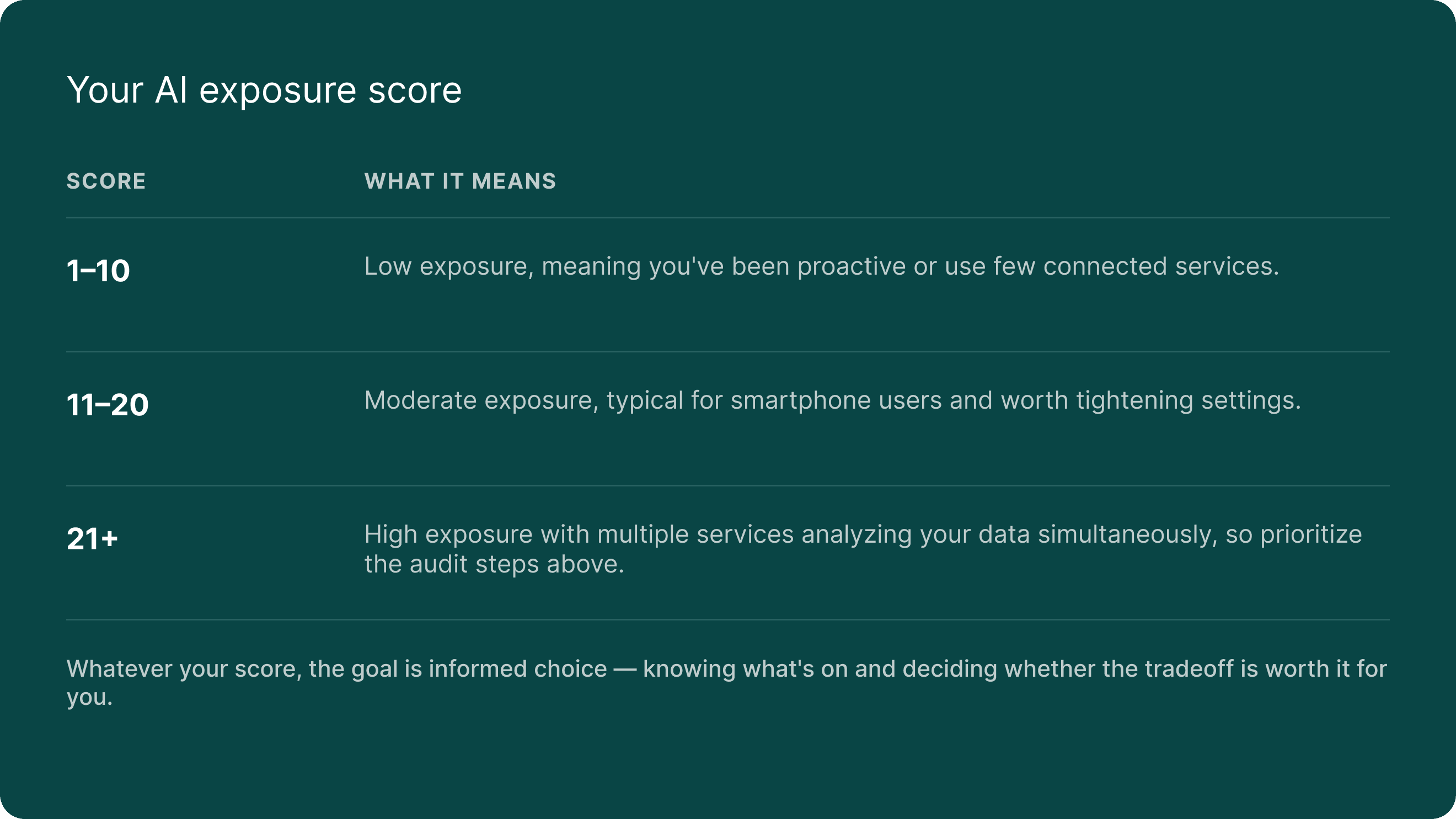
Your AI exposure score
Count the number of AI features you found active across all six areas. People usually find 15 to 25.
Your rights under new AI privacy laws
Governments worldwide are passing laws to protect your data from AI misuse, and where you live determines how much protection you actually have.
The EU: the global standard
The EU AI Act, the world's first AI law, is now in effect and bans social scoring, untargeted facial recognition, and workplace emotion detection. It gives EU citizens the right to know when AI makes a decision about them, to request human review, and to contest automated decisions.
Even if you're in the US, this applies to you indirectly because EU rules cover any service used by EU residents, and Google, Apple, and Microsoft all offer stronger privacy defaults to EU users than to Americans. (Same product, better privacy, just because of geography.)
California: leading the US
SB 942 (AI Transparency Act, January 2026): Large AI providers must offer free content detection tools and label AI-generated content.
AB 2013 (Training Data Transparency, January 2026): AI developers must disclose what training data they used.
ADMT Regulations (coming 2027): You'll have the right to opt out of AI-based "significant decisions" about your finances, housing, education, employment, or healthcare.
Colorado (June 2026)
You must be notified when AI makes a decision adverse to your interests, and you'll get a description of the system's purpose. Deployers must conduct annual impact assessments.
Texas (January 2026)
You must be told when you're interacting with AI, and Texas means business: a $1.4 billion settlement with Meta for unauthorized facial recognition, plus a $1.4 billion Google privacy settlement.
No federal law yet
There is no federal AI privacy law as of February 2026, and the Biden administration's AI Executive Order was revoked on the first day of the Trump administration.
The FTC's position remains: "There is no AI exemption from existing consumer protection law." Through Operation AI Comply, the FTC has brought at least a dozen enforcement cases against deceptive AI practices. 80% of Americans support AI regulation, even if it slows innovation.
What you can do right now, regardless of where you live:
1. Exercise opt-out rights since AI services offer training opt-outs in Settings.
2. Request your data because under CCPA or GDPR, you can request everything a company holds about you.
3. Appeal AI decisions and if denied insurance, credit, or a job, ask whether AI was involved.
4. File complaints by reporting concerns to your state AG, the FTC, or your data protection authority.
5. Document AI interactions and keep records for high-stakes decisions about health, finance, or insurance.
10 questions to ask before trusting any app with your data
You can't audit every AI tool you'll ever use, but you can ask the right questions, and these 10 work for any app, any service, any AI feature, today and five years from now.
1. Where is my data processed (on my device or in the cloud)?
Look for "on-device processing," "local AI," or "private cloud compute," and if there's no mention of where processing happens, that's a red flag.
2. Is my data used to train AI models?
Look for a clear opt-in or opt-out toggle, keeping in mind that all six major AI chatbot companies use data for training by default. If "We may use your data to improve our services" is buried in the terms with no toggle, be cautious.
3. Can I actually delete my data?
Look for a clear deletion policy with specific timelines, and remember that Google retains human-reviewed conversations up to 3 years even after you delete them. "Delete" doesn't always mean what you think it means.
4. Can humans read my conversations?
Look for an explicit statement about human review, and if there's no mention of it at all, that's not reassuring. Silence is never a good sign here.
5. Who else gets access to my data?
Look for specific third-party sharing policies, because ChatGPT now matches ads to conversation topics and Meta uses AI chats for ad targeting. You deserve to know who's in the room.
6. What happens to my data if the company is hacked?
Look for end-to-end encryption or zero-trust architecture, because if data is stored unencrypted or with company-held keys, a breach exposes everything.
7. Does the company make money from my data?
Look for a clear business model, subscription vs. advertising, because free AI services need revenue somehow. If there's no subscription, the business likely depends on your data. (If the product is free, you're probably the product.)
8. Can I use the service without the AI features?
Look for the ability to disable AI while keeping core functionality, and if AI features are mandatory with no opt-out, that tells you where priorities lie.
9. How transparent is the company about its AI practices?
Look for published privacy documentation, independent audits, and clear settings. If the privacy policy requires a law degree to understand, that's a choice the company made.
10. Does the company have a track record of protecting data?
Look for a clean enforcement record and security certifications, because a history of settlements, breaches, or regulatory actions speaks louder than any marketing page
Score your current tools:
Give each AI tool you use a score of 0 to 10 based on these questions. Anything below 5 deserves a second look, and anything below 3 deserves an alternative.
Taking control: what to do next
You've made it through a lot of information, and here's the honest truth: perfect privacy in 2026 is impossible, but informed privacy, knowing what's happening and choosing what you're comfortable with, is absolutely within reach.
Level 1: The 15-minute fix (do this today)
Run through the phone audit from Section 6
Disable AI training on your most-used chatbot (ChatGPT, Gemini, or Claude)
Turn off Gmail Smart Features (both toggles)
Check if Apple Intelligence re-enabled after your last iOS update
Bookmark this guide for reference
Level 2: The weekend project (1–2 hours)
Complete the full 30-minute audit from Section 6 across all six areas
Apply the 10-question framework to your five most-used AI tools
Review and adjust settings across all platforms (Google, Apple, Samsung)
Request your data from one major service (Google Takeout, Apple Privacy, or Meta's Download Your Information)
Set a quarterly calendar reminder to re-audit since AI settings change frequently
Level 3: The ongoing practice
Subscribe to privacy-focused news sources (EFF, Proton blog, IAPP)
Evaluate new AI tools before adopting them using the 10 questions
Explore privacy-first alternatives for your most sensitive data
Consider tools designed with zero-trust architecture for documents, insurance, financial records, and personal information
Stay informed about new AI laws since 1,208 AI-related bills were introduced across all 50 states in 2025 alone
AI is going to get more personal, more embedded, and more capable. The companies building it have choices to make about your data, and so do you.
Every setting you review, every question you ask, and every tool you evaluate moves you closer to a digital life where intelligence and privacy actually work together. A new generation of tools is already being built on a different premise, that your data works for you without being exposed to anyone else. Zero-trust architecture, on-device processing, and encrypted AI are already here and shipping on millions of devices.
FAQ: your AI privacy questions answered
How does AI protect privacy?
Several technologies make private AI possible right now. On-device processing keeps data on your phone, confidential computing encrypts data even during cloud processing, federated learning lets AI improve without seeing individual data, and zero-trust architecture encrypts your data with keys only you hold so the service can't read it even if it wanted to. All of these are already running on hundreds of millions of devices.
How does generative AI handle privacy and data security?
Depends entirely on the provider. Cloud-based services like ChatGPT and Google Gemini process your data on remote servers where it may be stored, reviewed by humans, and used for training. On-device approaches like Apple Intelligence keep most processing local, and privacy-first services like Proton encrypt data so even the provider can't read it. We explained each model in Section 2.
What is data privacy in AI?
It covers how your personal information is collected, stored, processed, and shared when AI systems interact with it, including whether your conversations train future models, whether humans review your data, how long it's retained, and whether you can control or delete it.
How does AI expand data collection?
Your phone's AI analyzes every photo you take, Gmail's AI reads every email you receive, and voice assistants create behavioral profiles from your requests. The average person has 15 to 25 active AI features processing their data at any given time, and Section 6 walks you through counting yours.
How can I protect my data from AI?
Start with the 30-minute audit in Section 6, then apply the 10-question framework from Section 8 to any new AI tool. The most impactful quick wins: disable AI training on your chatbots, turn off Gmail's Smart Features (both toggles), and check your phone's AI settings after every update.
Does ChatGPT save my data?
Yes. If you haven't opted out, conversations may be stored indefinitely and used to train future models, and even after opting out, conversations are retained for 30 days. As of February 2026, ChatGPT also shows ads matched to your conversation topics with personalization switched on by default.
Varies by platform:
ChatGPT: Settings > Data Controls > “Improve the model for everyone” (toggle off)
Google Gemini: Turn off “Keep Activity” in Gemini settings
Claude: Settings > explicit training choice (opt-in or opt-out)
Microsoft Copilot: Profile > Privacy > toggle off model training
Meta AI: Requires a formal objection form with no simple toggle for US users
LinkedIn: Settings > Data Privacy > Data for Generative AI Improvement > toggle off
What are the AI privacy laws in the US?
There is no federal AI privacy law, and state laws provide protection. California leads with the AI Transparency Act (2026) and upcoming automated decision-making rights (2027), Colorado requires notification of adverse AI decisions (June 2026), Texas requires disclosure when interacting with AI, and the FTC enforces existing consumer protection rules against deceptive AI practices. Section 7 covers all of this in detail.
Is AI safe to use?
Yes, with informed choices. AI delivers benefits like better search, smarter organization, helpful writing assistance, and fraud detection. The risk is using AI tools without understanding what happens to your data, and choosing tools that respect your privacy by design makes all the difference. This guide gives you everything you need to start making those choices.
Last updated: February 2026. AI privacy policies change frequently. Bookmark this guide and check back quarterly for updates.
Ready to take control of your digital life?
Experience private, effortless, and secure digital organization powered by intelligent AI